Mobile App for Dental Clinics: How It Helps Dentists Manage Clinics More Efficiently
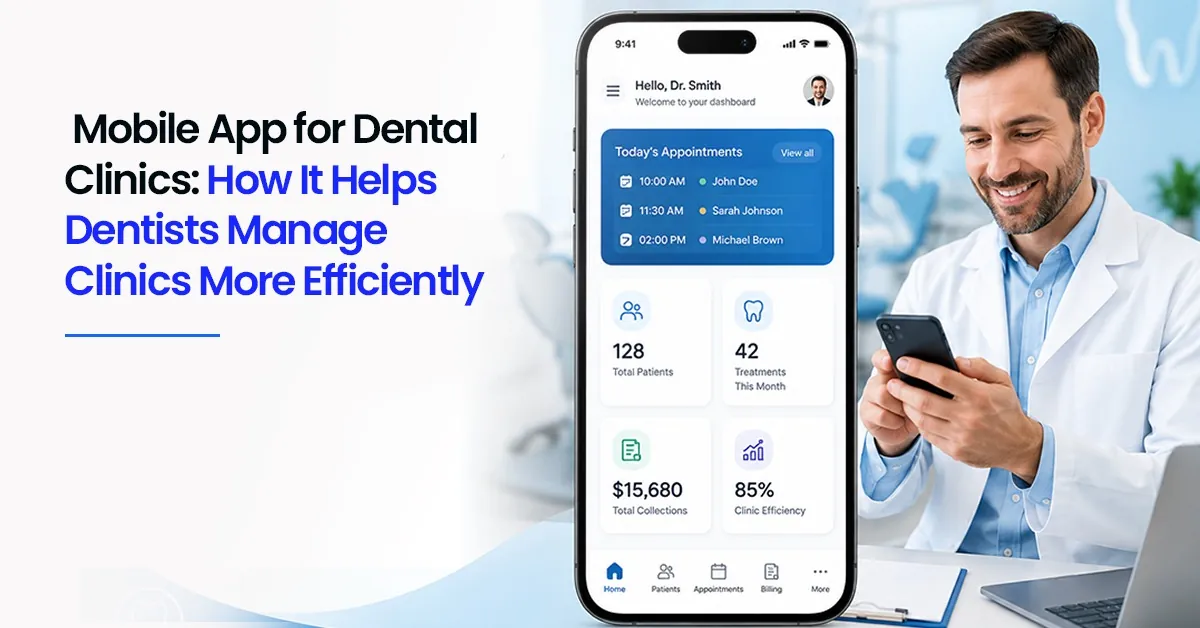

Dr Rekha runs a two-chair clinic in Kochi, and her day rarely starts at the clinic. It starts an hour earlier, in bed, scrolling through yesterday's pending payments and double-checking who's coming in first thing, her phone screen the only thing lighting up the room.
That's the part nobody talks about when they picture a dental practice. The clinic doesn't live only inside its four walls anymore. A good chunk of it travels with the dentist — into the car, into the school pickup line, into whatever's happening before the first patient sits down. This is exactly the gap a mobile app for dental clinics is meant to close.
The Desktop Habit Most Clinics Are Stuck In
For years, dental practice management meant one computer at the front desk, one person who knew how to use it, and everyone else waiting their turn to check something. That setup worked when clinics were smaller and slower. It works far less well now.
A dentist stepping out for lunch still gets a call about a patient's pending balance. A clinic owner travelling for a conference still needs to know if Saturday's slots are filling up. None of that should require logging into a desktop system that's sitting, unattended, back at the clinic. A study on a clinic-focused mobile app paired with cloud access found measurable improvements in how dentists handled scheduling changes and direct patient contact once that access moved off a fixed desktop and onto a phone.
A Familiar Tuesday, Without an App
1. A patient calls asking to move their slot — the receptionist has to check the desktop and call back
2. The dentist, away at a conference, can't confirm if Friday's column is full or has room for an emergency case
3. A payment comes in through a UPI app, but it doesn't show up anywhere until someone manually updates the ledger back at the clinic
4. A multi-branch owner has to call each location separately just to get a rough sense of the week
Why This Keeps Happening
It isn't that clinics don't want to be more flexible. It's that most practice management tools were built around a front-desk computer, with mobile access added on as an afterthought — usually clunky, slow, or missing half the features the desktop version has.
And accessibility isn't just a convenience question. The ADA's guidance on the doctor-patient relationship highlights responsiveness as part of what builds patient trust. A dentist who can glance at a phone and answer a patient's question on the spot, instead of saying, "Let me check and call you back," is offering a small but real version of that responsiveness.
What Changes Once the Clinic Fits in a Pocket
This is where a genuine mobile app for dental clinics earns its place — not as a smaller copy of the desktop tool, but as a way of running the practical side of the clinic from anywhere.
1. Scheduling Without Being Tied to the Desk
A dentist can glance at tomorrow's column from the car, move a slot between two patients, or block out time for an emergency case, all without calling the front desk.
2. Patient Records on Hand, Not Just on a Shelf
Treatment history, past notes, and X-rays sitting in a pocket-sized app mean a dentist walking into a room already knows the context, instead of waiting for someone to pull up a file.
3. Billing That Doesn't Wait for Someone to Sit Down
Payments and pending balances updating in real time means nobody's reconciling numbers a week later, trying to remember who paid what.
4. One View Across Multiple Branches
For owners running more than one location, a phone showing every branch's day at a glance replaces a string of phone calls just to get a sense of how busy things are.
🔍 Worth Knowing: A mobile app earns its place when it does the same job as the desktop tool, not a stripped-down version of it. If staff still need to "wait until they're back at the computer" to do half their tasks, the app isn't actually solving the problem.
A Quick Before-and-After
This is roughly what changes for a clinic that's moved its day-to-day off a single fixed desktop. Dentobees, for instance, offers a mobile companion to its core dental clinic management software, so scheduling, billing, and patient records stay in sync whether someone's at the front desk or out of the building entirely.
Before: Dr Rekha calls the clinic from her car to check if a 4 p.m. slot opened up. The receptionist puts her on hold to check the desktop.
After, Dr Rekha checks the app at a red light, sees the slot's still open, and texts the patient back herself before she's even parked.
Small moment. But multiply it across a week, and that's hours of waiting, calling back, and double-checking that simply stop happening.
| Without Dentobees App | With Dentobees App |
| Schedule changes need a call to the desk | Schedule checked and changed from anywhere |
| Records only visible at the clinic computer | Treatment history available on the spot |
| Payments reconciled manually, days later | Payments and balances update in real time |
| Owners call each branch separately | One view shows every branch at a glance |
| Staff wait their turn to use one system | Role-based access shows everyone what they need |
Where Clinics Tend to Go Wrong With This
1. Picking an app that only mirrors basic scheduling, leaving billing and records stuck on the desktop
2. Letting only the owner use the app, while staff stay locked into the old desktop-only habit
3. Treating mobile access as a bonus feature rather than the default way of checking the clinic
4. Ignoring how the app handles offline moments — patchy signal shouldn't mean the whole system stalls
Key Takeaways
1. Clinic management increasingly happens outside the clinic, not just at the front desk
2. A real mobile app should mirror the desktop's core functions, not offer a thinner version
3. Quick on-the-spot responses build the kind of patient trust that builds loyalty
4. Multi-branch owners benefit most from a single mobile view across locations
5. The right app removes waiting, not just moves where the waiting happens
Conclusion
None of this is about replacing the front desk or making the desktop system obsolete. It's about making sure a dentist or owner isn't stuck whenever they happen to be away from it. The clinics that adapt fastest are usually the ones where the phone in someone's pocket can do almost everything the computer at the desk can — and that's quietly becoming the difference between a clinic that runs smoothly and one that's always playing catch-up.
Frequently Asked Questions
1. What can a mobile app actually do for a dental clinic?
A well-built mobile app extends most of what a dental clinic management software platform does on desktop — scheduling, patient records, billing, and reminders — onto a phone, so staff and dentists aren't tied to one computer to get things done.
2. Is a mobile app necessary for a small, single-dentist clinic?
It helps regardless of size. Even a solo dentist benefits from checking tomorrow's schedule or a pending payment without being at the clinic, especially during a busy week with back-to-back commitments outside the practice.
3. How does a mobile app help with appointment reminders?
Most mobile platforms tie directly into dental appointment reminder software, so confirmations and reminders go out automatically and any replies show up on the same phone the dentist is already using to manage the rest of the day.
4. Can multiple staff members use the same clinic app on different phones?
Yes—most clinic apps support role-based access, so the front desk, the dentist, and the owner each see what's relevant to them, without needing separate systems or shared logins.
5. What's the difference between a mobile app and a regular dental ERP system?
They're usually part of the same platform. A dental ERP system handles the full back-end of clinic operations, while the mobile app is the on-the-go window into that same data — not a separate or lighter product.
6. Why should multi-branch dental clinics care about this more?
Because checking on multiple locations without a mobile view usually means several phone calls just to understand the day. A single app showing every branch at once removes that entirely.
Navyatha VP is a professional content writer specializing in healthcare, dental software and digital marketing. With a background in Mass Communication and Journalism, she focuses on distilling complex topics into clear, actionable insights that help professionals make informed decisions. When she isn’t crafting digital content, Navyatha explores new social media trends, travels or loses herself in a good book.
Download our Mobile APP



Best Dental Practice Management Software & Advanced Dental ERP Suite
Door No.2328, 3rd Floor, Phase 2, Hilite Business Park, Hilite City, Kozhikode - 673014, Kerala, India
Get the latest updates from DentoBees
Click to
Subscribe