Dental ERP vs practice management software: which one does your clinic actually need?
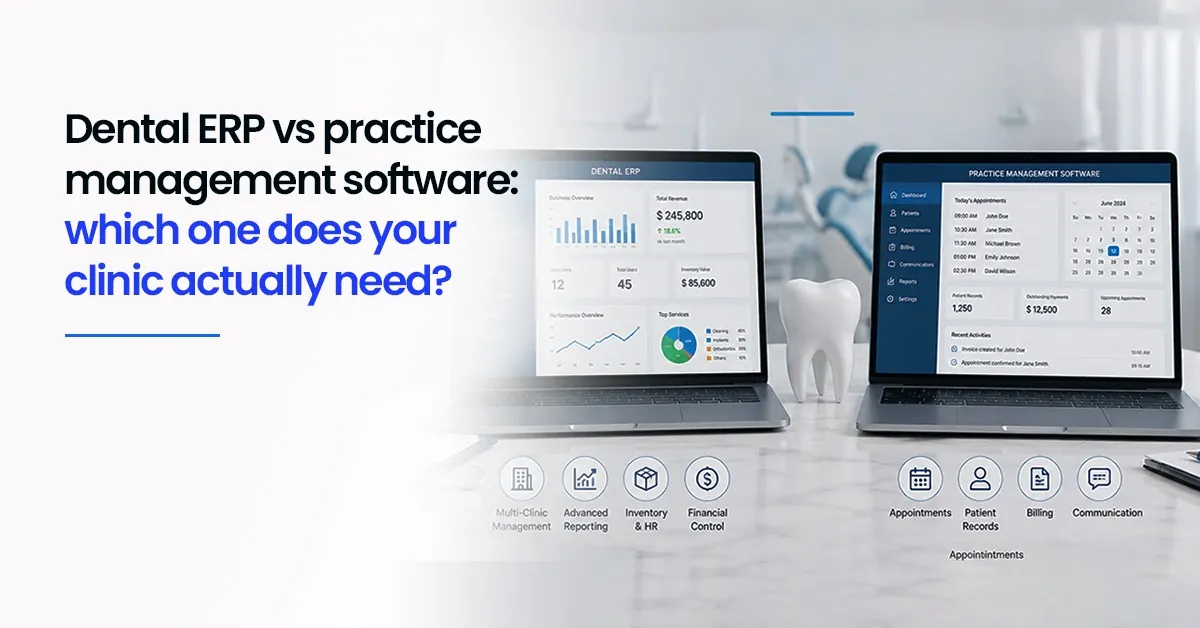

A dentist once described their clinic software to us like this: "It books appointments and prints bills. Beyond that, I'm on my own." That is a surprisingly common situation. The software is there, it is being used but large parts of running the clinic, like inventory, staff management, multi branch reporting and cash flow and still happen manually, in Excel sheets, or simply from memory.
If that sounds familiar, you have probably started hearing the term "dental ERP" at some point. Maybe from a vendor, maybe at a conference. And then comes the question nobody quite answers clearly: what is the actual difference between what I have now and what an ERP does?
This blog is the honest answer to that question.
| This is not a pitch for one type of software over another. It is a practical breakdown so you can make the right call for your clinic's actual size and workflow. |
What is dental practice management software?
Traditional dental practice management software is built around the day-to-day clinical and front desk workflow. In most clinics it handles appointments, patient records and treatment notes, billing and receipt generation and a basic daily collections dashboard.
For a clinic moving away from paper files and Excel sheets, this is a genuinely useful upgrade. It is designed for dentists, not IT teams. It is relatively quick to set up and familiar to use.
The limitation is scope. Most traditional practice management tools are built to handle one main job typically OPD plus billing. Everything else inventory, payroll, multi-branch visibility, analytics — is either absent or treated as an afterthought, managed separately through manual effort.
That works fine when the clinic is small and the owner is also the manager. As the practice grows, the workarounds multiply. And at some point and the system that was meant to simplify things starts creating its own overhead.
So what is a dental ERP — and how is it different?
ERP stands for Enterprise Resource Planning. In plain terms, it means a system that connects all the main functions of your business — not just one or two of them.
For a dental clinic, that means OPD and front desk, billing and accounts, inventory and laboratory orders, HR and payroll, and analytics and cash flow monitoring — all working from one shared database.
The key word is connected. In a traditional practice management setup, treatment records live in one place, billing in another, inventory in a spreadsheet and staff details somewhere else. Transferring information between these areas requires manual effort — and manual effort creates gaps.
In a dental ERP, a treatment note recorded in OPD can automatically update the billing queue, trigger a patient reminder, and deduct the materials used from inventory. The same entry does multiple jobs without anyone needing to touch it again.
| The clearest way to put it: a practice management system handles one or two departments well. An ERP tries to make all of them talk to each other through one consistent structure. |
Traditional ERP vs modern ERP — an important distinction
If the term "ERP" sounds like something designed for large hospitals or corporate IT departments, that perception is understandable. Historically, ERP systems were on-premise, expensive to set up, required dedicated servers and took months to implement. For a small or mid-sized dental clinic, it genuinely felt like overkill.
Modern ERP is different in almost every way that matters for a clinic:
1.Cloud-based: No
server room, no IT contractor and no local installation. You log in from a
browser or mobile app.
2.Modular: You
do not have to implement everything at once. Start with scheduling and billing,
then add inventory or analytics when you are ready.
3.Easier to use: Designed
for clinic staff, not software engineers. Interfaces are cleaner,
mobile-friendly and updated automatically.
4.Priced for clinics: Subscription-based
pricing makes modern ERP accessible for practices that would never have
considered it five years ago.
In practice, a modern dental ERP feels more like a smart, deeply connected practice management system than a complex IT project. The principle is the same — one database, one view of the practice — but the experience of using it is far more approachable.
What do you actually gain by moving to a dental ERP?
Fewer data silos
The moment you
stop maintaining separate files for OPD, billing and inventory, a lot of daily
friction disappears. Information entered once flows where it needs to go no
more copying the same patient details across three different places.
Better visibility across the practice
With a single
dashboard, a clinic owner can see new patients, completed procedures, stock
levels and outstanding payments — without making calls or chasing printed
reports. For multi-branch practices, this kind of unified visibility is
especially significant.
Easier scaling
Traditional practice management
tools often struggle when a second branch is added. You end up managing two
separate systems and manually consolidating data. ERP structures are built for
this. Centralised billing, unified patient records and consolidated reporting
all become much simpler.
Reduced manual work for staff
In clinics
running on disconnected tools, front desk staff spend significant time
re-entering information across systems. That time compounds. An ERP removes
most of those manual handoffs, giving the same team more capacity without
adding headcount.
Which type of software is right for your clinic?
There is no universal answer and any vendor who tells you otherwise is oversimplifying. The right choice depends on a few honest questions about your clinic:
1.Are you running a single-chair practice or do you have
multiple dentists and support staff?
2.Do you currently manage inventory, lab orders, or staff
payroll in separate tools or manually?
3.Are you planning to expand — a second branch, more
chairs, a larger team?
4.How much of your management time goes into chasing
reports and reconciling information from different places?
If your answers are mostly "no, single, not yet, not much" — a good practice management tool is probably the right fit for now. If you are already managing complexity, or expecting to in the next year, an ERP will start paying for itself in reduced overhead fairly quickly.
| One useful test: ask the software vendor — "Does this treat my clinic as one connected business, or is each function still separate?" The answer tells you whether you are looking at a practice management tool or a true dental ERP. |
Where does Dentobees fit in?
Dentobees is built as a dental ERP — designed specifically for Indian dental clinics, from single-chair practices to multi-branch groups. It connects OPD, billing, inventory, patient communication and analytics in one platform, without the complexity or cost of traditional enterprise software.
If your clinic is at the stage where you are outgrowing your current system — or if you are managing too many things across too many separate tools — it is worth seeing how Dentobees works in a clinic like yours.
| Book a free demo and walk through how Dentobees handles your clinic's actual workflow — from OPD to billing to analytics. Visit dentobees.com to get started. |
Key takeaways
1.Traditional practice management software handles OPD
and billing well, but treats other clinic functions as separate manual tasks.
2.Dental ERP connects all major functions — clinical,
financial and operational — into one system with a shared database.
3.Modern, cloud-based
dental ERP is far more accessible and affordable than older on-premise
systems.
4.The right choice depends on your clinic's complexity,
team size and growth plans — not on which term sounds more advanced.
5.When evaluating software, ask if it connects your
clinic as one business or just digitises isolated tasks.
Conclusion
For most dental clinics, the journey starts with practice management software and that is the right starting point. It solves the immediate problem: getting off paper, organising appointments and generating bills. There is nothing wrong with that.
But clinics do not stay the same. As you add staff, open branches, take on more patients and try to understand your numbers more clearly, the basic tools start showing their limits. Things that should be automatic require manual effort. Things that should be visible require someone to dig for them.
That is the moment when the conversation about ERP stops being abstract and starts being practical. Not because ERP is "better" in some general sense — but because your clinic has grown into needing what ERP actually provides: a single, connected view of your practice.
The goal, ultimately, is to spend less time managing your software and more time running your clinic. Whether that means a well-configured practice management tool or a full dental ERP, the test is simple — does your current system give you that? If not, it is worth exploring what a better one looks like.
Frequently asked questions
1.
What is the difference between dental ERP and practice management software?
Practice
management software typically focuses on one or two core functions —
appointment scheduling, patient records, and basic billing. Dental ERP connects
all major clinic functions — OPD, billing, inventory, HR, analytics — into one
system sharing a single database. The result is fewer manual handoffs, better
visibility, and easier scaling as the practice grows.
2.
What is the difference between traditional ERP and modern ERP?
Traditional
ERP systems were on-premise, expensive, and required significant IT
infrastructure — making them impractical for small clinics. Modern ERP is
typically cloud-based, modular, and priced on a subscription model. It updates
automatically, works from any browser or mobile device, and can be implemented
in stages without a large upfront commitment.
3.
Does a small dental clinic need an ERP system?
Not
necessarily. A small single-chair practice with limited staff can function well
with a good practice management tool. ERP becomes valuable when a clinic starts
managing complexity: multiple dentists, inventory tracking, staff payroll,
multi-branch operations, or a need for consolidated financial visibility. If
those challenges are present or expected soon, ERP is worth considering.
4.
How is ERP different from a management system?
A management
system usually automates one business area — for example, scheduling or
billing. ERP integrates multiple areas — operations, finance, inventory, HR —
under one roof, so they work from the same data. In practice, an action in one
area (like recording a treatment) automatically updates related areas (billing,
inventory, reminders) without manual re-entry.
5.
What is the best dental practice management software in India?
There is no
single best option — the right choice depends on your clinic's size, budget,
and feature requirements. For Indian clinics, look for software that supports
GST billing and compliance, has good customer support in your region, and
matches your actual workflow. Platforms like Dentobees are built specifically
for the Indian dental market with these needs in mind.
6.
Can a dental clinic switch from practice management software to ERP without
disruption?
Yes — most
modern dental ERPs are designed to be implemented in stages. You typically
start with the modules that replace your existing system (scheduling, billing,
records) and add additional capabilities (inventory, analytics, HR) over time.
A phased approach reduces the learning curve for staff and allows the clinic to
keep operating normally during the transition.
7.
What should I look for when choosing dental clinic software?
Match the
software to your real workflow — not just the feature list. Key things to
check: does it handle GST billing and compliance requirements? Does it connect
the functions your team actually uses? Is there local support available? Can it
grow with your clinic, or will you outgrow it in two years?
Navyatha VP is a professional content writer specializing in healthcare, dental software and digital marketing. With a background in Mass Communication and Journalism, she focuses on distilling complex topics into clear, actionable insights that help professionals make informed decisions. When she isn’t crafting digital content, Navyatha explores new social media trends, travels or loses herself in a good book.
Download our Mobile APP



Best Dental Practice Management Software & Advanced Dental ERP Suite
Door No.2328, 3rd Floor, Phase 2, Hilite Business Park, Hilite City, Kozhikode - 673014, Kerala, India
Get the latest updates from DentoBees
Click to
Subscribe