From OPD to administration: how a dental ERP unifies every department in your clinic
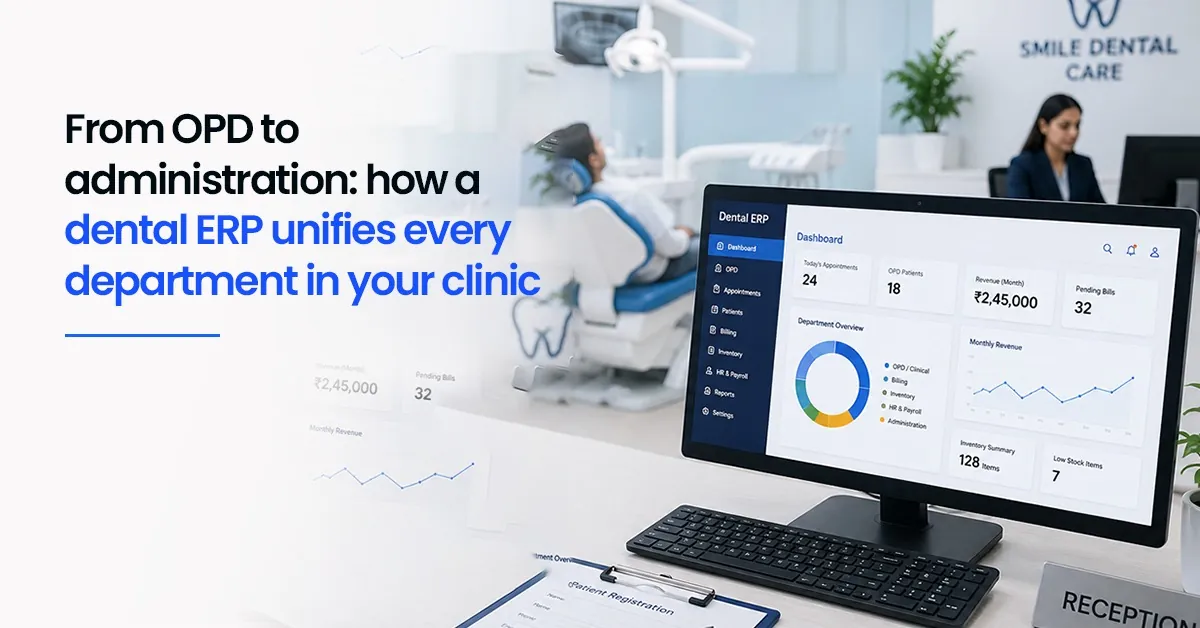

It is a busy Tuesday morning. The waiting area has six patients. The receptionist is handling a walk-in while her phone rings. In the treatment room, the dentist is looking for last month's X-ray it is in a folder somewhere. The billing desk is chasing a payment from a patient who left twenty minutes ago. And in the back, someone just noticed that composite resin stock is almost out.
None of this is unusual. In fact, for most multi-staff dental clinics, this is just a regular day. But look closely and you will see the real problem: every department is running on its own. The receptionist's schedule does not automatically talk to the billing desk. The dentist's treatment notes do not flow into the invoice. The inventory count does not connect to what was used in the last procedure.
What looks like a busy clinic is actually a collection of isolated workflows held together by memory, habit, and manual effort. And that combination — however hard the team works — creates gaps. Missed bills. Stockouts. Follow-ups that never happen.
A dental ERP changes this. Not by adding more tools, but by replacing isolated ones with a single system where every department shares the same data and every action in one area automatically updates the others.
| This blog walks through how a dental ERP works across each department of a clinic — from OPD and front desk to billing, inventory, and HR — and why the connection between them matters more than any single feature. |
Why clinics struggle without a unified system
The problem is not that clinics lack software. Most clinics today use some form of digital tool — a scheduling app, an Excel billing sheet, a WhatsApp group for staff communication. The problem is that these tools do not talk to each other.
What usually happens is this: a treatment gets recorded in OPD but the billing desk does not hear about it until the patient is already at the reception desk asking for their bill. Or a patient misses a follow-up because the reminder was supposed to be sent manually and no one had the time. Or a procedure has to be paused halfway because a material ran out and the pharmacy did not know to reorder it.
Each of these individually seems like a small operational hiccup. But they happen multiple times a day, every day and across every department. Together they represent significant revenue leakage, staff frustration, and patient dissatisfaction.
The common mistake clinic owners make is adding more apps to solve specific problems — a reminder tool here, a billing app there — without realising that more tools without integration just creates more places for information to get lost.
| The fix is not more software. It is one connected system where a single entry in OPD automatically updates billing, triggers a reminder, and logs the materials used — without anyone needing to manually transfer that information. |
How a dental ERP works across every department
A dental ERP is built around one shared database. Every department — OPD, front desk, billing, inventory and HR — works from the same data in real time. When something changes in one area, it is immediately reflected in all the others. Here is what that looks like in practice:
| Department | What ERP changes | How it works |
| OPD | Instant access to full patient history, X-rays, allergies, and previous treatments. Automated reminders sent before appointments. | Treatment notes recorded here flow automatically to billing queue. Schedule syncs with front desk in real time. |
| Front desk | Live slot view, patient check-in status, insurance details all in one screen. No manual handoffs. | Check-in updates OPD dashboard instantly. Patient contact changes reflect everywhere — billing, reminders, records. |
| Billing | Invoices generate from OPD treatment entries — no manual re-entry. Procedure codes, payments, and outstanding dues tracked. | Linked to insurance and payment modules. Rejected claims flagged for follow-up automatically. |
| Inventory | Stock levels deduct automatically when materials are used. Low-stock alerts trigger before items run out. | Tied to billing for accurate procedure costing. Purchase orders can be triggered from the same system. |
| HR & admin | Staff shift logs feed directly into payroll. Compliance reports generated automatically for audits. | Role-based access ensures every team member sees only what they need — protecting patient data and simplifying training. |
The key detail in this setup is role-based access. The billing team sees billing. The dentist sees clinical notes. The manager sees everything. Nobody is navigating screens that are not relevant to their job, and sensitive information stays protected.
| One thing many clinic managers overlook: the value of an ERP is not just in what each module does individually — it is in what happens automatically when they are connected. Change a patient's contact number at reception, and their upcoming reminder uses the new number. Record a crown procedure in OPD, and the billing queue already has it. |
How ERP enables smooth department interactions
Think of a dental ERP as the clinic's central nervous system. Every department is a part of the body, and ERP is what makes them respond to each other without requiring someone to manually relay information between them.
Here is a realistic example of how this plays out: A patient calls to book an emergency appointment. Reception creates the slot. OPD sees it on the schedule immediately and can prepare the relevant patient history. The pharmacy gets a heads-up on which materials might be needed based on the appointment type. When the procedure is done, billing already has the treatment entry and generates the invoice. If a follow-up is needed, it gets scheduled automatically.
In a clinic without ERP, each of these steps involves someone calling, messaging, or physically walking over to relay information. It takes time, and information gets lost in translation. With ERP, the workflow happens automatically — the system carries the information so the people do not have to.
From what we have seen in real clinic operations, the biggest day-to-day improvements come not from any single feature but from these handoffs becoming automatic. The receptionist stops being a human router for information. The billing desk stops chasing treatments that were never communicated to them. The dentist stops spending the first two minutes of every appointment hunting for patient records.
Implementing a dental ERP: the 7 stages and 4 major phases
Moving to a dental ERP is not a switch you flip overnight. A well-managed implementation follows a clear structure — and clinics that skip stages almost always regret it. Here is how it works:
The 7 stages of ERP implementation
1.Assessment — Audit your current workflows. Where is billing getting delayed? Where do patients fall through the cracks? Identify the bottlenecks before choosing a system.
2.Planning — Define what you want the ERP to achieve. Set a realistic budget, identify who will own each module, and agree on a timeline.
3.Design — Work with your vendor to configure the system to your clinic's specific workflows — not a generic template.
4.Development — Integrate the ERP with any existing tools you are keeping, such as imaging software or lab systems.
5.Testing — Run the system through real clinic scenarios before going live. Fix issues in testing, not in front of patients.
6.Deployment — Launch department by department, not all at once. Start with scheduling and OPD, then add billing, then inventory.
7.Support and training — Provide ongoing training, especially for staff who were not involved in setup. Most implementation problems surface in the first month.
The 4 major phases
These 7 stages group into 4 broader phases that give a useful overview of the journey:
• Discovery — Assessment and planning. Understanding what the clinic needs before touching any software.
• Configuration — Design and development. Building the system around the clinic's actual workflows.
• Go-Live — Testing and deployment. Running the system live, department by department.
• Optimisation — Support and refinement. Adjusting based on real usage in the first weeks and months.
| Pro tip from clinics that have done this well: involve staff in the design stage. When the people who will use the system every day help shape how it works, adoption is far smoother. Resistance usually comes from feeling like something is being done to the team — not with them. |
6 real benefits of a dental ERP — as they show up daily
The benefits of an ERP are often described in abstract terms. Here is what they actually look like in a clinic's day-to-day:
1. Unified data — one source of truth
Patient
records, billing history, inventory levels, and staff schedules all live in one
place. Nobody is working from yesterday's spreadsheet or a note they missed.
2. Efficiency gains — routine tasks run themselves
Appointment
reminders go out automatically. Invoices generate from treatment records. Stock
alerts trigger before items run out. Staff time goes to patients, not to
administrative tasks that the system can handle.
3. Error reduction — less manual entry, fewer
mistakes
Every time
information is transferred manually — from OPD notes to a billing spreadsheet,
from a prescription to an inventory count — there is an opportunity for error.
ERP removes most of those transfer points.
4. Insightful reporting — you can see what is
actually happening
Dashboards show
revenue trends, no-show patterns, which procedures are most common, which days
are busiest. This kind of visibility is almost impossible to get from
disconnected tools — and it changes how clinic owners make decisions.
5. Scalability — the system grows with your clinic
Whether you are
adding a second dentist, opening a second branch, or just handling more
patients, an ERP scales without requiring a new system. Multi-branch
dashboards, centralised billing, and unified patient records come with the same
platform.
6. Cost control — you can see where money is going
Overstocked
supplies, underutilised appointment slots, unbilled procedures — all of these
show up in an ERP's reporting that would never surface in a manual system. Cost
control starts with visibility.
The biggest challenge: getting the team on board
Ask any clinic that has been through an ERP implementation what the hardest part was, and the answer is almost always the same: not the software, but the people.
Staff who have been managing with their own systems — however imperfect — often resist change, especially when a new system involves a learning curve in the middle of a busy clinic day. This resistance is normal, and it is not a sign that something is wrong with the team. It is a sign that the change is significant.
What works: phasing the rollout (starting with just OPD scheduling before adding billing), hands-on training rather than just documentation, and involving staff in decisions about how the system is configured. Clinics that rush the training stage and go fully live all at once face the hardest transitions.
What does not work: announcing the switch on Monday and expecting full adoption by Wednesday. Even well-designed software takes time to feel natural. Give the team space to learn it with real patients rather than in a pressure cooker.
| The clinics that have the smoothest ERP transitions are the ones that treat it as a team project, not a technology upgrade. When the receptionist helped configure the check-in flow and the billing staff helped test the invoice module, they go live as owners of the system — not reluctant users of something imposed on them. |
How Dentobees unifies clinic departments in practice
Dentobees is built specifically for dental clinics — not adapted from a generic business ERP. That distinction matters in day-to-day use. The modules are shaped around how dental clinics actually work: OPD treatment notes that flow directly to billing, inventory that connects to procedure records, automated patient reminders that reduce no-shows without any manual effort from the front desk.
In many clinics, the first visible improvement comes from the connection between OPD and billing. Treatment entries stop getting lost between the chair and the invoice. Billing staff stop chasing the dentist to confirm what was done. The invoice is ready before the patient reaches the front desk.
For multi-staff or multi-branch clinics, the reporting and role-based access features make the management layer significantly simpler. The clinic owner can see how every branch is performing without calling anyone or pulling separate reports.
| If your clinic is currently managing departments through separate tools, spreadsheets, or manual handoffs, a demo of Dentobees is the fastest way to see what a connected system actually looks like in your context. Visit dentobees.com to book a free demo. |
Key takeaways
1.The root cause of most clinic operational problems is
fragmented, disconnected tools — not hard-working staff.
2.A dental ERP connects every department through one
shared database, so information flows automatically without manual handoffs.
3.The biggest gains come from the connections between
modules: OPD to billing, billing to inventory, scheduling to reminders.
4.ERP implementation works best in phases — start with
OPD and scheduling, then add billing, then inventory and HR.
5.Staff buy-in is the most important implementation
factor. Involve the team early and give adequate time for training.
6.Tools like Dentobees
are built for dental clinic workflows specifically, making the transition far
smoother than a generic business ERP.
Conclusion
Running a dental clinic is genuinely complex. You are managing clinical care, patient relationships, staff coordination, inventory, billing, and compliance — all at once, often with a small team. The fact that most clinics manage this with a patchwork of disconnected tools is a testament to how hard clinic teams work, not an endorsement of the approach.
A dental ERP does not make the work disappear. What it does is remove the friction between departments — the manual relaying of information, the duplicate data entry, the moments where something important slips between one system and another. When those friction points are removed, the same team can do more, make fewer errors, and focus on what actually matters: patient care.
The shift from disconnected tools to a unified ERP is not just a technology decision. It is a decision about how the clinic wants to operate — and how much of the team's time should go to managing information versus managing patients.
For most clinics that make the transition thoughtfully, the answer becomes clear fairly quickly. Not in abstract metrics, but in the quality of a Tuesday morning that used to feel chaotic and no longer does.
Frequently asked questions
1.
What is the effect of ERP on various departments in a dental clinic — and how
does it achieve it?
A dental ERP
gives each department real-time access to shared data, eliminating the need for
manual information transfer between teams. In OPD, it provides instant access
to patient histories and automates appointment reminders. In billing, it
generates invoices directly from treatment records. In inventory, it tracks
stock levels automatically and triggers alerts before items run out. In HR, it
logs staff attendance and feeds payroll. All of this happens through a single
shared database — when one department updates a record, every other department
sees it immediately.
2.
What are the 7 stages of ERP implementation in a dental clinic?
The 7 stages
are: (1) Assessment — audit your current workflows and identify bottlenecks;
(2) Planning — define goals, budget, and team responsibilities; (3) Design —
configure the system around your clinic's specific workflows; (4) Development —
integrate with any existing tools being retained; (5) Testing — run the system
through realistic clinic scenarios and fix issues before go-live; (6)
Deployment — launch department by department, starting with OPD and scheduling;
(7) Support and training — provide ongoing sessions and adjust the system based
on real usage in the first month.
3.
How does ERP facilitate interactions between departments in a dental clinic?
ERP creates
automated workflows between departments so information moves without manual
intervention. For example, when a dentist completes a procedure and records it
in OPD, the billing module immediately has the treatment entry ready for
invoicing. When a patient's contact details are updated at reception, the
reminder system uses the new number automatically. When a material is used in a
procedure, inventory levels adjust in real time. These automated handoffs
replace manual calls, messages, and data re-entry — which is where most errors
and delays originate.
4.
What are the 4 major phases of dental ERP implementation?
The 7 stages
group into 4 major phases: (1) Discovery — assessment and planning to
understand what the clinic needs before any configuration; (2) Configuration —
design and development to build the system around actual clinic workflows; (3)
Go-Live — testing and phased deployment, starting with the highest-impact
modules; (4) Optimisation — post-launch support and refinement based on how the
system performs in real daily use. Skipping any phase — especially the
discovery and optimisation stages — is the most common reason ERP
implementations underperform.
5.
What are the 6 main benefits of ERP in a dental clinic?
The 6 main
benefits are: (1) Unified data — one source of truth across all departments;
(2) Efficiency gains — routine tasks like reminders, invoicing, and stock
alerts run automatically; (3) Error reduction — removing manual data transfer
removes the main source of billing and record errors; (4) Insightful reporting
— dashboards show revenue trends, no-show rates, and procedure patterns that
are impossible to track in disconnected systems; (5) Scalability — the system
handles multi-dentist and multi-branch growth without requiring a new platform;
(6) Cost control — visibility into overstocking, unbilled treatments, and
underutilised slots helps identify and fix revenue leakage.
6.
What is the biggest challenge with ERP implementation in dental clinics?
The most
consistent challenge is staff resistance to change. Staff who are used to
existing workflows — however imperfect — often push back on new systems,
especially if they feel the change is being imposed without their input. The
most effective counter is involving staff early: let them participate in the
configuration and testing stages, phase the rollout rather than switching
everything at once, and give adequate time for hands-on training. Clinics that
skip training and rush the go-live stage face the most disruption, regardless
of how good the software is.
7.
How does Dentobees help unify dental clinic departments?
Dentobees is
built specifically for dental clinic workflows — not adapted from a generic
business ERP. Its OPD module connects directly to billing, so treatment entries
automatically populate invoices without manual re-entry. The inventory module
tracks usage against procedures and triggers reorder alerts. Patient reminders
are automated from the scheduling module. HR logs feed payroll directly. For
multi-branch or multi-dentist clinics, a unified dashboard gives owners
real-time visibility across the whole practice. It is designed to be
implemented in stages, starting with the modules that will have the biggest
immediate impact on day-to-day operations.
Navyatha VP is a professional content writer specializing in healthcare, dental software and digital marketing. With a background in Mass Communication and Journalism, she focuses on distilling complex topics into clear, actionable insights that help professionals make informed decisions. When she isn’t crafting digital content, Navyatha explores new social media trends, travels or loses herself in a good book.
Download our Mobile APP



Best Dental Practice Management Software & Advanced Dental ERP Suite
Door No.2328, 3rd Floor, Phase 2, Hilite Business Park, Hilite City, Kozhikode - 673014, Kerala, India
Get the latest updates from DentoBees
Click to
Subscribe